Computer Graphics and Multimedia Software - Knowledge Sharing

Showing posts with label ARTag. Show all posts

Wednesday, May 4, 2011

ARTag : SDK demonstrating AR

Demo AR Programs using ARTag

There are four main programs demonstrating AR (augmented reality) using ARTag; , <3d_augmentations>, and . The first two have two versions, one with “_usb.exe” for most cameras such as USB webcams, and the second “_dragonfly.exe” is for the Point Grey Dragonfly camera from Point Grey Research (www.ptgrey.com) often used in university labs that gives better performance and was used by myself in ARTag development.

1. The program uses the “base0” image and just draws a few graphics primitives and a textured logo image relative to the marker array, its purpose is to be a simple example for people programming with the SDK.

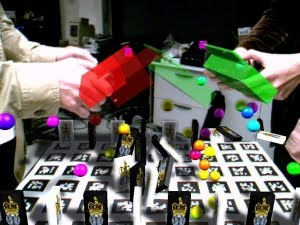
2. The <3d_augmentations> demo is more interesting, it was used to create the images at the first page of this document. This program uses the “base0” array, and the individual toolbars. To save space in the download, and for permission reasons, only 5 models are provided in the demo and SDK download; fish, Chihuahua, car, frog, and can of asparagus model.

If you run this application, aim the camera at the base0 and toolbar arrays and you should see 3D virtual objects rendered relative to them.

Fiala (2004) has developed new system called ARTag was inspired by ARToolkit. ARTag was taking advantage of the increased computing processing power available. ARTag uses more complex image processing and digital symbol processing to achieve a higher reliability and immunity to lighting



Share:

Camera Resolution : Setting Resolution Problems

Camera Resolution: Bigger = Better Performance, Setting Resolution Problems

The larger the input camera image is, the smaller the markers can be and still be detected, and the less the JPEG artefacts will disturb the detection. Unfortunately the OpenCV cvcam interface that was used in these demos is not able to properly set the camera resolution, it usually defaults to a lower resolution such as 160x120 or 320x240.

The camera resolution should not be confused with the resolution of the graphics window, the demo program window can be 640x480 when the camera resolution is only 160x120. The picture of the background will just appear grainer and more pixelated. The system will work better if the camera can be set to a higher resolution.

Some users have found that if they run another program where you can set the camera resolution first, then it will run with a higher resolution when you run the ARTag demos. For some, the programs downloaded from http://www.shrinkwrapvb.com/ezvidcap.htm seem to do the trick on some computers.


Share:

Friday, November 26, 2010

Augmented Reality XNAGoblin using ALVAR

Toolkit for Augmented Reality Games development using XNA

Goblin XNA is a platform for research on 3D user interfaces, including mobile augmented reality and virtual reality, with an emphasis on games. Need to setting up your computer should have the specification : Windows XP, Vista, or 7 Requirements for running XNA Game Studio 3.1.
It is written in C# and based on Microsoft XNA Game Studio 3.1. XNAGoblin details


Goblin XNA http://graphics.cs.columbia.edu/projects/goblin/ uses a scene graph to support 3D scene manipulation and rendering, mixing real and virtual imagery. 6DOF (six-degrees-of-freedom) position and orientation tracking is accomplished using the ALVAR or ARTag marker-based camera tracking package with DirectShow or PGRFly (for Point Grey cameras), and InterSense hybrid trackers. In addition to regular desktop and hand-held computer displays, Goblin XNA also supports the Vuzix iWear VR920 head-worn display in monoscopic and stereoscopic modes, along with its 3DOF orientation tracker. Physics is supported through the Newton Game Dynamics library, and networking through the Lidgren library. Goblin XNA also includes a 2D GUI system to allow the creation of classical 2D interaction components.

Installation XNA 


XNA is a very cool initiative from Microsoft that takes away the need for a lot of the low level coding normally required in the creation of a computer game. This is achieved by a set of libraries, tools and use of the C# programming language.

Below some of the concepts and series of basic knowledge on XNA Programming :

Develop 2D games :

# Installing XNA and opening your first XNA project
# Rendering 2D images to the screen
# Scaling, rotating and positioning 2D images
# Keyboard input
# Playing sound effects in XNA
# Per-pixel texture manipulations
# Random terrain slope generation
# Alpha blending
# Collision detection (the most complex case is covered: per-pixel transformed)
# And even a complete 2D particle engine for the explosions!

Develop 3D games:

# Starting a project: setting up and using the Development Environment
# The effect file: effects are needed to draw stuff on the screen
# The first triangle: defining points, displaying them using XNA
# World space: defining points in 3D space, defining camera position
# Rotation & translation: rotating and moving the scene
# Keyboard: read user input on the keyboard using XNA
# Load 3D models, adding colors, textures
# Lighting basics: lighting can be complex to fully understand, a whole chapter on this subject


Are games really written using XNA?

The main target for XNA is hobbyists and for people learning to write games. Since it uses C# (a managed language that requires a runtime environment) it runs a lot slower than equivalent C++ code (that compiles down to machine level code) so commercial PC and Xbox 360 games are typically written in C++. Having said this with the release of XNA 3.0 Microsoft have created a means of releasing your own game written using XNA online (via Xbox Live) and obtaining royalties for it (set at 70%). How profitable this is remains to be seen.

How do you get started with XNA?

To create XNA games for the PC is completely free. You just need to download the XNA Game Studio from Microsoft and you can use it with the free version of Visual Studio C# Express. If you already own the commercial Visual Studio 2008 that can (and should) be used instead as it adds more features.

The software required to start writing your own XNA code is completely free:

Microsoft XNA Game Studio 2.0, the programming environment
Microsoft Visual Studio C# Express (link, make sure you select the C# edition, marked in green). XNA Game Studio 2.0 will also work with the full version of Visual Studio 2005.

Why is it cool?

XNA takes away a lot of the pain of working with the graphics, input etc. on a PC, Xbox or Zune. It implements the .NET framework and comes with a number of tools for game creation. It supports graphics via managed Direct3D and the Xbox 360 controller (for Xbox or PC). It supports sound and includes a content creation tool for sound developers. From version 3.0 it includes multi player support. C# itself is a very nice language to program for.
Share:

Malaysia Augmented Reality

Its incredibly difficult to discover the undiscovered. Here will see how I can help you. Cheers - Ajune (comp.utm.my/ajune)
ajune@utm.my. Powered by Blogger.